Pen controller
As a controller in the form of a pen, the Logitech-Controller MX Ink is supported. The pen can be used to place position markers very precisely in room corners.
The pen controller has these operating elements:
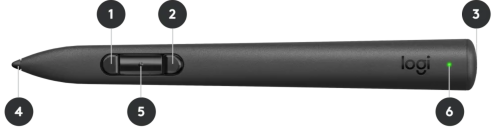
- Front/bottom pen button
- Rear/upper pen button (also called trigger button): You use your index finger to press it
- Meta button
 - Switch between application and browser view
 - Pen tip
- Centre pen button
- Battery indicator

The default assignment is this:
- Open the menu with the optional help display
- Execute the primary tool action (e.g. setting a position marker, selecting an element or triggering a laser measurement)
- Switch between browser mode and VRplugin-autotooltip__default plugin-autotooltip_bigVirtual reality (VR)
Virtual reality (VR) is a computer-generated, interactive environment in which a person can fully immerse themselves. With the help of special devices such as VR glasses, the real world is completely replaced by a simulated one. The user experiences a three-dimensional, artificial environment that can appeal to all the senses./ARplugin-autotooltip__default plugin-autotooltip_bigAugmented Reality (AR)
Augmented reality is a technology that integrates digital elements into the real world. The user's field of vision is overlaid with a digital layer that displays additional information or virtual objects. In contrast to virtual reality ( mode
Use the meta button (3) to switch between mixed reality mode (you are there in the vrdoro-visualizer application and can use it) and the browser view (you are then in the room with the browser and are no longer in the VRplugin-autotooltip__default plugin-autotooltip_bigVirtual reality (VR)
Virtual reality (VR) is a computer-generated, interactive environment in which a person can fully immerse themselves. With the help of special devices such as VR glasses, the real world is completely replaced by a simulated one. The user experiences a three-dimensional, artificial environment that can appeal to all the senses./ARplugin-autotooltip__default plugin-autotooltip_bigAugmented Reality (AR)
Augmented reality is a technology that integrates digital elements into the real world. The user's field of vision is overlaid with a digital layer that displays additional information or virtual objects. In contrast to virtual reality ( mode). in the application).
The pen controller can be used as an alternative to one of the Standard controller can be used.