This is an old revision of the document!
Products and tools
3D and VRplugin-autotooltip__default plugin-autotooltip_bigVirtual reality (VR)
Virtual reality (VR) is a computer-generated, interactive environment in which a person can fully immerse themselves. With the help of special devices such as VR glasses, the real world is completely replaced by a simulated one. The user experiences a three-dimensional, artificial environment that can appeal to all the senses. products, 3D configurators, virtual environments and software tools can be realised with the vrdoro-visualizer. All products and tools have (where appropriate) the functions described for Menu bar .
The products you can use depend on your licence. You can see the list of available products by clickplugin-autotooltip__default plugin-autotooltip_bigClick
Depending on the device, clicking is the user's action to select an element. On devices with a mouse, this means pointing at the element and pressing the left mouse button. For devices with a touchscreen, it is touching or touching and holding (iOS: long touch). In theing on the '+' next to 'Elements' in the project:
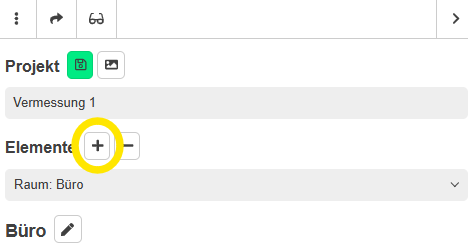
Some tools, such as the cut-out marker, should be subordinate to another tool, e.g. room measurement. You can assign the 'cut-out marker' tool, for example, by inserting it when you have selected a room from the list. The tool is then assigned to the room.
You can delete a tool with all its data by clickplugin-autotooltip__default plugin-autotooltip_bigClick
Depending on the device, clicking is the user's action to select an element. On devices with a mouse, this means pointing at the element and pressing the left mouse button. For devices with a touchscreen, it is touching or touching and holding (iOS: long touch). In theing on the '-'.
The following list contains the available products.
Some products and tools can only be used together with other products. These include, for example, the tools Position markers and Laser measurement . These tools have the tag 'Helper-Tool' (see also Auxiliary tools) at the bottom of the page.